Transforming Your Brand Visuals: A Practical Guide to the 10 Startup Outline Icons Bundle
In the fast-paced world of digital marketing and entrepreneurship, visual communication is not just a luxury; it is a fundamental requirement. Whether you are building a mobile application, designing a pitch deck, or structuring a complex website, the imagery you choose dictates how your audience perceives your brand's professionalism. The 10 Startup Outline Icons Bundle offers a curated solution for this, featuring essential symbols like Target, Team, Teamwork, and Time Management. However, simply possessing high-quality assets is only half the battle. The true challenge lies in how you implement them. Many professionals, from freelancers to small business owners, make critical errors when integrating icon sets into their workflow, leading to disjointed designs and wasted time.
The Foundation: Understanding the Asset
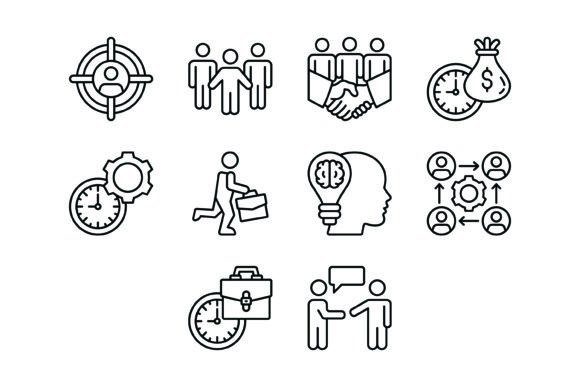
Before diving into application strategies, it is vital to understand what the 10 Startup Outline Icons Bundle actually provides. This collection is not merely a random assortment of images; it is a thematic toolkit designed to address the specific visual language of business growth. The bundle includes icons representing Target, Team, Teamwork, Time Is Money, Time Management, Going To Work, Creativity, Workflow, Working Hours, and Negotiation.
One of the most common misunderstandings among users is the undervaluation of file formats. This bundle comes equipped with AI, EPS, JPG, PNG, and SVG files. A beginner might default to using the JPG files for a website, not realizing that this limits their ability to resize the image without pixelation. Conversely, a professional designer might attempt to use the SVG files for print projects without checking compatibility with their specific printing vendor. The 10 Startup Outline Icons Bundle includes these diverse formats specifically to ensure cross-platform suitability, but you must match the file type to the medium.
Avoiding the "Set It and Forget It" Design Trap
A frequent mistake in the design process is the failure to customize. The 10 Startup Outline Icons Bundle is designed to be "ready to use," which is a significant advantage for efficiency. However, using these icons exactly as they appear in the download folder can make your brand look generic. If your website uses a specific shade of blue or a particular corner radius for buttons, downloading the icons and dropping them in without adjusting their color palette or stroke weight creates visual dissonance.
Imagine you are building a landing page for a productivity app. You select the Time Management and Workflow icons. If your site uses rounded corners and soft pastels, but the icons are sharp and high-contrast black, the user experience suffers. The solution is not to search for a new icon pack but to utilize the vector capabilities of the AI or EPS files included in the bundle. Because these are 100% vector icons, you can easily edit the stroke width to match your typography or change the fill color to align with your brand identity. This level of customization ensures that the icons feel like an integrated part of your design rather than an afterthought.
Contextual Relevance: Choosing the Right Symbol
Another area where users often stumble is semantic clarity. Icons are a language, and using the wrong word can confuse your audience. The 10 Startup Outline Icons Bundle offers distinct concepts such as Negotiation and Going To Work. While they may seem interchangeable in a broad business context, they communicate very different ideas.
For instance, using the Negotiation icon—which typically features a handshake or dialogue bubbles—might be perfect for a "Partnerships" section of your website. However, using it for a "Terms of Service" page might send the wrong signal about the rigidity of your legal agreements. Similarly, the Target icon is excellent for "Goals" or "KPIs," but overusing it can dilute its impact.
A better approach is to map your content strategy before selecting icons. List out the key sections of your presentation or app interface. If you have a section dedicated to company culture, the Team and Teamwork icons are distinct choices: Team might represent the individuals, while Teamwork represents the collaboration process. Understanding these nuances prevents miscommunication and ensures your visual aids support your narrative rather than distract from it.
Technical Pitfalls and How to Solve Them
When working with the 10 Startup Outline Icons Bundle, technical execution is paramount. One major error is ignoring the scalability of the assets. Because the bundle includes formats like SVG (Scalable Vector Graphics), users often assume that any size will work perfectly. However, outline icons rely on strokes. If you scale a vector icon down too small for a mobile app interface, the lines may merge, making the Creativity icon look like a blurry blob.
Practical Advice: Always test your icons at the specific pixel size they will be displayed. If you are designing for mobile, test the Working Hours icon at 24x24 pixels or 32x32 pixels. If the details become illegible, you may need to simplify the icon or increase the size. Conversely, if you are using the icons for a large presentation slide, ensure the lines are not too thin to be seen from the back of a room.
Furthermore, file management is a skill often overlooked. Downloading a ZIP file and extracting it onto your desktop creates digital clutter. Create a structured folder system: separate the files by format (AI, EPS, PNG, SVG) and perhaps by category (Marketing, Operations, HR). This organization speeds up your workflow significantly when you are in the middle of a tight deadline and need to quickly grab the Negotiation icon for a last-minute slide.
Evaluating Quality and Consistency
When you download the 10 Startup Outline Icons Bundle, you are investing in consistency. One of the biggest headaches in design is mixing and matching icons from different sources. This often results in mismatched line weights, different corner radii, or varying optical weights. The result looks amateurish and untrustworthy.
Before applying these icons to a client project or your own startup branding, perform a quick audit. Line up all ten icons side-by-side on an artboard. Check if the Time Is Money icon has the same visual "heft" as the Going To Work icon. Even in high-quality bundles, minor adjustments might be needed to ensure perfect harmony across your specific background colors.
Conclusion
The 10 Startup Outline Icons Bundle is a versatile and powerful asset for anyone looking to elevate their visual communication. It bridges the gap between abstract business concepts and concrete visual understanding. However, the value of this bundle is unlocked only when you move beyond basic usage. By understanding file formats, respecting the semantics of each symbol, customizing to fit your brand, and rigorously testing for scalability, you transform these simple outlines into professional-grade design elements. Whether you are a freelancer building a portfolio or an educator creating course materials, these icons provide the clarity and professionalism your project deserves.