Evaluating the 10 Smart Home Outline Icons Bundle for Modern Digital Projects
In the realm of UI/UX design, the visual language used to represent technology is just as critical as the technology itself. For developers and designers working on home automation dashboards, IoT applications, or smart lifestyle blogs, the choice of iconography can significantly impact user experience. The 10 Smart Home Outline Icons Bundle presents a specific collection of assets—featuring a Smart Speaker, Vacuum Cleaner, Washing Machine, and others—aimed at bridging the gap between functionality and aesthetic minimalism. However, before integrating these assets into a workflow, it is essential to evaluate their distinct characteristics, file versatility, and how they stack up against alternative visual approaches.
Analyzing the Core Components of the Bundle
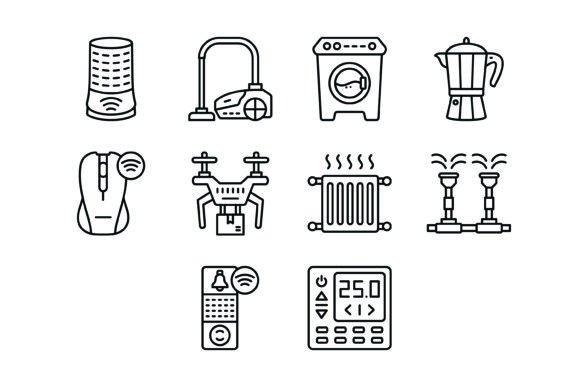
The distinctiveness of the 10 Smart Home Outline Icons Bundle lies in its curated selection of devices. Unlike generic icon packs that might focus solely on lighting or security, this bundle addresses the "lifestyle" aspect of smart homes. It includes icons for a Coffee Maker, Irrigation System, and Drone, which suggests a focus on both domestic utility and modern tech hobbies.
When evaluating these assets, users should look beyond the subject matter to the execution. The bundle is marketed as "line icons," which implies a stroke-based design rather than solid fills. This style is often preferred in modern interface design because it reduces visual noise, allowing users to scan information quickly without being overwhelmed by heavy graphics. For a dashboard displaying the status of a Central Heating system or a Thermostat, this lightweight approach can make the interface feel more breathable and intuitive.
Technical Specifications and Format Versatility
A major decision factor for any design asset is its technical flexibility. The 10 Smart Home Outline Icons Bundle includes five different formats: AI, EPS, JPG, PNG (Transparent Background), and SVG. This range is designed to cover the majority of use cases, from high-end vector editing to quick web implementation.
- Vector Formats (AI, EPS, SVG): These are crucial for scalability. If a designer needs to scale the Wireless Mouse icon from a mobile app button to a large presentation slide, vector formats ensure no loss of quality. The inclusion of SVG is particularly relevant for web developers, as SVGs are resolution-independent and typically load faster than image-based formats.
- Raster Formats (JPG, PNG): The PNG files with transparent backgrounds are essential for layering icons over various colored backgrounds without unsightly white boxes. JPGs are useful for quick previews or contexts where transparency is not required.
This multi-format approach compares favorably to single-format icon sets often found in free repositories. While free alternatives might offer a single PNG or a basic SVG, the inclusion of editable vector source files (AI/EPS) in this bundle allows for deeper customization, such as changing stroke weights or colors to match a specific brand identity.
Comparing Style: Outline vs. Solid and Flat vs. 3D
When choosing icons, designers often face a stylistic crossroads. The 10 Smart Home Outline Icons Bundle utilizes a "line" or "outline" style. This contrasts sharply with "solid" or "glyph" icons, which are filled with color.
The Outline Advantage: Outline icons, such as the Doorbell or Smart Speaker in this bundle, tend to convey a sense of modernity and elegance. They are often easier to align with text labels in navigation menus. However, they can sometimes suffer from legibility issues at very small sizes (under 16px), where the lines might merge or become invisible.
The Solid Alternative: Solid icons are generally better for high-contrast environments or for users with visual impairments, as they are recognizable instantly. If the primary audience is using the app in high-glare environments (like a kitchen app near a stove), solid icons might be a safer bet than outlines.
The 10 Smart Home Outline Icons Bundle is best suited for contexts where clarity and a minimalist aesthetic are prioritized over immediate, high-contrast recognition. If the project requires "filled" versions for toggle states (e.g., a "filled" icon for active and an "outline" for inactive), the user would need to verify if the bundle provides these variations or if they need to be manually created.
Decision Factors: When is This Bundle the Right Fit?
Determining whether to invest in the 10 Smart Home Outline Icons Bundle depends heavily on the project's scope and the designer's existing library.
Best-Fit Scenarios
- Niche Smart Home Applications: If you are building a specific interface for a smart washing machine or a coffee maker control panel, this bundle provides ready-to-use metaphors that save time compared to commissioning custom illustrations.
- Startups and MVPs: For Minimum Viable Products (MVPs) where budget and time are limited, using a pre-made bundle allows for a polished look without the overhead of a design agency.
- Educational Content: For blogs or presentations explaining "Smart Home 101," the icons serve as clear visual aids to break up text and illustrate concepts like Irrigation Systems or Central Heating.
Limitations and Tradeoffs
Despite its utility, there are tradeoffs to consider. The bundle contains 10 specific icons. For a comprehensive smart home ecosystem app—which might require icons for dozens of different sensors, locks, cameras, and lights—a bundle of 10 may be insufficient. In such cases, a larger, more comprehensive library (often subscription-based) might offer better value and consistency across a wider range of devices.
Furthermore, while the bundle claims to be "Easy to edit," the actual editability depends on how the vectors are constructed. "Outline" icons can sometimes be complex paths that are difficult for beginners to manipulate in Adobe Illustrator or Figma without distorting the design.
Practical Application and User Experience
From a user experience perspective, the 10 Smart Home Outline Icons Bundle promotes a "clean UI" philosophy. In a smart home dashboard, clutter is the enemy. By using thin-line icons for the Thermostat or Vacuum Cleaner, designers can maintain a sleek interface that feels responsive and high-tech.
However, it is worth noting the trend toward "Dynamic Icons" in modern OS design (like iOS and Android), where icons change appearance based on the state of the device (e.g., a fan spinning). Static outline icons are excellent for navigation and labels but may require additional animation work to feel truly "smart" in a dynamic dashboard context.
Conclusion
The 10 Smart Home Outline Icons Bundle is a specialized toolkit for designers who value minimalism and need specific representations of modern household tech. Its strength lies in its multi-format delivery and clean aesthetic, making it a strong candidate for mobile apps, websites, and presentations where a modern look is desired. However, it is best viewed as a component of a larger design system rather than a standalone solution for complex, feature-rich applications. By weighing the need for specific device icons against the requirement for scalability and state variations, users can make an informed choice on whether this bundle aligns with their creative and functional goals.