Streamlining Digital Projects with 49 Online Education Flat Multicolor Icons
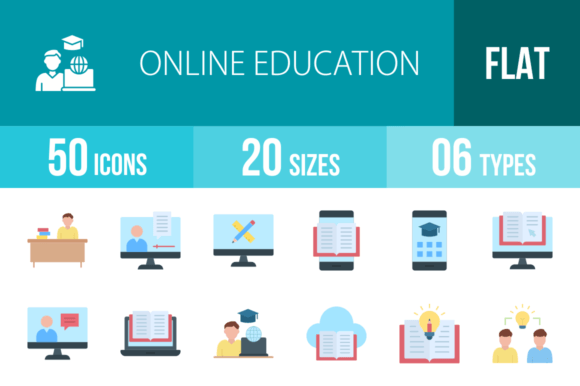
In the landscape of digital content creation and e-learning development, visual communication is not merely decorative; it is functional. Whether you are an educator building a course module, a startup founder prototyping an EdTech application, or a marketer designing a presentation on digital transformation, the assets you choose dictate the clarity of your message. The 49 Online Education Flat Multicolor Icon set is designed to bridge the gap between complex educational concepts and user-friendly interface design. This collection is not just a random assortment of graphics; it is a structured toolkit intended to solve specific communication problems within the online learning ecosystem.
Understanding the Asset Ecosystem
Before integrating any visual asset into a project, it is essential to understand its architecture. This specific icon set features 49 distinct concepts ranging from foundational elements like Student Desk and Stationary to advanced technological integrations like Cloud Library and Video Conferencing. The design philosophy relies on the unigrid system, which ensures that the visual weight and dimensions of a Laptop icon are consistent with a Certificate or a Book. This consistency is crucial for maintaining a professional aesthetic across large-scale projects.
Furthermore, the utility of the icons is defined by their versatility. Delivered in six different formats—AI, CDR, EPS, JPG, PNG, and SVG—these assets are prepared for any stage of the production pipeline. The vector formats (AI, EPS, SVG) allow for infinite scalability, meaning a single icon of a University can be used as a tiny favicon on a browser tab or blown up to billboard size without pixelation. The raster formats (PNG, JPG) are optimized for immediate use in web development and social media posts, with 20 different sizes available to ensure the perfect fit for responsive layouts.
Strategic Implementation in UI/UX Design
For web developers and app designers, the integration of these icons often occurs during the wireframing and high-fidelity prototyping phases. When designing a Learning Management System (LMS), navigation clarity is paramount. Users need to instantly recognize where to find their Online Course, access their Class Timetable, or join a Virtual Classroom.
Instead of generic placeholders, using the specific Online Test or Tutorial icons during the design phase helps stakeholders visualize the final product more accurately. This reduces feedback loops and accelerates decision-making. The multicolor aspect of the set is particularly useful for categorizing content. For example, you might assign blue tones to all Reading Online and Article assets to signify passive learning, while using vibrant oranges for interactive elements like Games Based Learning or Problem Solving.
Enhancing E-Learning Content and Presentations
Content creators and educators face the constant challenge of maintaining student engagement. Long blocks of text in an e-book or a lecture slide can cause cognitive overload. The 49 Online Education Flat Multicolor Icon set serves as a visual anchor to break up this monotony.
Consider the workflow of creating a slide deck for a webinar on Distance Learning. Rather than listing bullet points, a presenter can use the Video Conferencing, Microlearning, and Global Education icons to create a visual narrative. This process aids in information retention; the audience associates the concept of "Global Reach" with the specific visual of the globe icon. Similarly, when compiling a Cloud Library or an Online Document repository for a corporate training manual, using icons like Bookmark and Language Translation helps users navigate complex information hierarchies without confusion.
Workflow Integration and Asset Management
Efficiency in a creative workflow depends on how well assets are organized. Because these icons are designed with a consistent unigrid system, they function as a cohesive family rather than disparate elements. This allows for a streamlined implementation process.
When a freelancer receives a brief to design an "Online Academy" landing page, the workflow typically involves three steps: selection, customization, and deployment.
- Selection: The designer scans the set for relevant concepts. For a landing page, this might include Male Student, Female Student, Group Class, and Online Counselling.
- Customization: Using the vector files (AI or EPS), the designer can easily adjust the colors to match the client’s brand guidelines. The flat design style makes it simple to change fill colors without worrying about complex gradients or shadows.
- Deployment: The finalized icons are exported as SVGs for the web (ensuring fast load times and crisp edges) or high-resolution PNGs for print materials like brochures promoting Online Convocation or Graduation ceremonies.
Broadening the Scope: Beyond Education
While the set is tailored for education, the utility of these icons extends into general business and productivity contexts. The concept of E-Learning overlaps significantly with corporate training. An HR department creating onboarding materials can use icons like Diploma, Certificate, and Practice Based Learning to outline employee growth paths.
Similarly, a tech startup might find the Laptop, Tablet, and Mobile Learning icons useful for illustrating cross-platform compatibility in their marketing materials. The visual language of flat design is universally understood, making these icons effective in communicating technical specifications or workflow processes without the need for lengthy explanations.
Quality Control and Long-Term Usability
One of the primary concerns when using third-party assets is consistency over time. The 49 Online Education Flat Multicolor Icon set mitigates this risk through its vector-based foundation. As display technology evolves and screen resolutions increase, raster images often become obsolete. However, vector icons remain sharp and relevant.
For a business owner or publisher, this means a one-time investment in these assets provides long-term value. Whether you are updating a website for the third time or printing new flyers for a Creative Teaching workshop, the icons will not degrade in quality. Additionally, the "Easy to edit" feature ensures that if a specific icon—such as Sharing Ideas or Recorded Lecture—needs to be tweaked to better fit a new layout, it can be done quickly in standard design software without requiring specialized skills.
Conclusion
The 49 Online Education Flat Multicolor Icon collection is more than a decorative resource; it is a functional component of a professional digital toolkit. By offering a blend of conceptual breadth—from Online Knowledge to Stationary—and technical depth through multiple file formats and a unigrid system, it supports a wide range of workflows. Whether you are building an app, designing a curriculum, or marketing an educational service, these icons provide the visual clarity and technical flexibility required to execute your project with precision and professionalism.