Decoding the Language of Electronics: Your Ultimate Guide to Electric Circuit Icons
In the intricate world of electronics and electrical engineering, clarity is not just a convenience—it is a safety requirement. Whether you are a student learning the basics of Ohm’s Law, a professional engineer drafting a schematic for a new power supply, or a developer creating a physics simulation, the ability to communicate complex ideas instantly is vital. This is where the language of electric circuit symbols becomes your most powerful tool. Just as traffic signs guide drivers without the need for written words, circuit icons guide technicians and engineers through the flow of electricity.
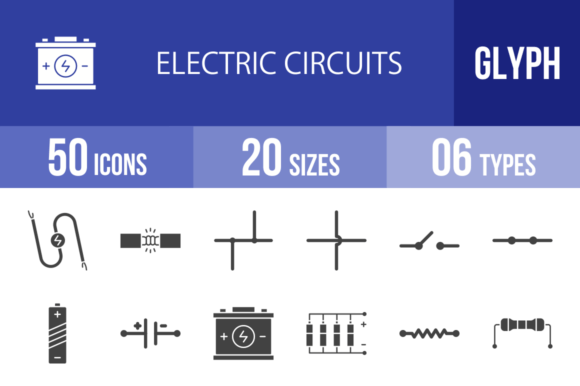
However, finding high-quality, versatile, and standardized icons can be a challenge. This article explores a comprehensive collection of 50 Electric Circuits Glyph Icons, designed to bridge the gap between complex technical schematics and modern digital communication. We will explore why these icons matter, how to use them across different platforms, and break down the specific components represented in this essential toolkit.
The Universal Language of Schematics
Electricity is invisible. You cannot see the current flowing through a wire or the voltage drop across a resistor. To visualize these concepts, engineers use a standardized set of symbols known as schematics. A schematic diagram is a two-dimensional representation of an electrical circuit, where every line, dot, and shape has a specific meaning.
For the uninitiated, a schematic can look like abstract art. But for the trained eye, it tells a story of function and logic. For example, a Resistor is represented by a zigzag line (in the US standard) or a rectangle (in the European standard), symbolizing the opposition to current flow. A Capacitor, which stores energy in an electric field, looks like two parallel lines separated by a gap, representing the plates inside the device.
The importance of these icons extends beyond blueprints. In modern education, teachers use visual aids to explain how a Battery provides electromotive force. In mobile app development, UI/UX designers use glyphs to indicate settings for Bluetooth speakers or charging statuses. Having a reliable set of icons that work on both a printed circuit board (PCB) design and a smartphone screen is essential for the modern tech landscape.
Introducing the 50 Electric Circuits Glyph Icon Set
Not all icon sets are created equal. Many free resources online are poorly drawn, inconsistent in style, or locked in formats that are difficult to edit. The 50 Electric Circuits Glyph Icons collection addresses these pain points by offering a curated set of 100 vector icons (50 distinct symbols in various styles) designed using a unigrid system.
This system ensures that every icon, from a simple Wire to a complex Operational Amplifier, aligns perfectly within a consistent grid. This visual harmony is crucial when building user interfaces or educational posters. You want the Lamp to look like it belongs in the same family as the Switch, ensuring your design looks professional and cohesive.
Designed for Every Platform
One of the standout features of this collection is its versatility. In the digital age, content is consumed on screens of all sizes and resolutions. This icon set is ready to use for all devices and platforms. Whether you are building a responsive website, a native iOS or Android app, or a desktop presentation, the icons maintain their crispness.
The collection comes in 6 different formats: AI, CDR, EPS, JPG, PNG, and SVG. This variety is the key to "future-proofing" your projects.
- SVG (Scalable Vector Graphics): Perfect for web development. SVGs are lightweight and can be scaled to any size without losing quality, making them ideal for responsive design.
- AI and EPS: These are industry-standard vector formats for graphic designers. They allow for easy editing in software like Adobe Illustrator, meaning you can change colors, line weights, or combine elements to create custom diagrams.
- JPG and PNG: These raster formats are perfect for quick use in Word documents, PowerPoint presentations, or social media posts.
Because they are 100% vector icons, you can scale a simple Diode symbol to the size of a billboard or shrink it down to a favicon, and it will remain sharp and legible. This scalability is a massive advantage for print media, specifically for templates and educational worksheets where clarity is paramount.
A Deep Dive into the Components: From Basics to Logic Gates
This icon set covers the full spectrum of electrical engineering, from basic passive components to complex logic gates and transducers. Let’s categorize some of the key icons to understand their significance.
1. Power Sources and Connections
Every circuit needs energy. The icons for Wire, Wire Connection, Wires Crossed Joined, and Wires Crossed Not Joined are the building blocks of any diagram. Understanding the difference between a crossed wire that connects (a node) and one that doesn't (a bridge) is fundamental to reading schematics correctly.
For power, the set includes the Cell and Battery I/II. A single cell represents a single electrochemical unit, while a battery symbol represents a combination of cells. The set also includes AC Supply, DC Voltage Source, and AC Voltage Source, allowing users to differentiate between the steady flow of direct current (like in a flashlight) and the oscillating flow of alternating current (like in a wall outlet).
2. Control and Protection Devices
Control is about managing the flow of electricity. The Switch and Switch Closed icons are essential for showing how a circuit is turned on or off. The Fuse icon is critical for safety diagrams, representing a sacrificial component that breaks the circuit if the current gets too high, preventing fires.
Variable control is represented by the Potentiometer (a three-terminal resistor acting as a voltage divider) and the Rheostat (used to control current). These are commonly found in volume knobs and light dimmers.
3. Passive and Active Components
The Resistor I and Resistor II icons are used to show opposition to current. The Variable Resistor and Thermistor (a resistor whose resistance changes significantly with temperature) allow for dynamic circuit designs.
Active components include the Diode, which acts like a one-way street for electricity, and the Light Emitting Diode (LED), which emits light when current flows through it. The set also includes the Light Dependent Resistor (LDR), often used in streetlights to turn them on automatically when it gets dark.
4. Transducers and Output Devices
Transducers convert energy from one form to another. This set includes a variety of output devices:
- Lamp, Lamp Incandescent, Lamps in Parallel, and Lamps in Series: These icons are vital for teaching the difference between series and parallel circuits. In a series circuit, if one lamp blows, they all go out. In parallel, they remain lit.
- Motor: Represents the conversion of electrical energy into mechanical energy.
- Audio Devices: The set includes a Bell, Buzzer, Loudspeaker, and Microphone. These are essential for alarm system diagrams or audio equipment schematics.
- Indicator Lamp: Used on control panels to show the status of a machine (e.g., "Power On").
5. Advanced Components and Logic Gates
For more advanced applications, the set features the Operational Amplifier (Op-Amp), a high-gain electronic voltage amplifier with a differential input and a single-ended output. It is the backbone of analog electronics.
Furthermore, the set includes the fundamental building blocks of digital electronics: Logic Gates. The AND Gate, NAND Gate, OR Gate, NOR Gate, XOR Gate, XNOR Gate, and NOT Gate are included. These icons are not just for electrical engineers; they are used in computer science education to teach Boolean algebra and the logic behind computer processors.
Practical Applications: Where to Use These Icons
The utility of these glyph icons extends far beyond the engineering lab. Here is how different professionals can leverage this collection:
For Educators and Students
Physics and engineering teachers can use these icons to create engaging worksheets, quizzes, and interactive whiteboards. Because the icons are easy to edit and scale, a teacher can highlight specific parts of a circuit or color-code components to explain current flow. Students can use them to digitally assemble virtual circuits for homework assignments.
For Web and App Developers
If you are building a mobile app for a smart home system, you need icons that look good on a Retina display. Using the SVG or PNG formats ensures these icons look crisp on high-resolution screens. You can use the Transformer icon for power settings, the Heating Element for a smart thermostat interface, or the Galvanometer for a diagnostic tool.
For Technical Writers and Bloggers
Writing a blog post about how to fix a car battery? The Battery and Fuse icons can break up long blocks of text and make instructions easier to follow. The Power Pack icon is perfect for articles about portable charging solutions. These icons add a layer of professionalism and visual appeal that stock photos often cannot match.
For Print and Presentation
Corporate presentations often suffer from "death by bullet points." Using these icons in PowerPoint or Keynote can transform a boring slide about energy infrastructure into a visual story. Because the set includes formats like CDR and EPS, print designers can easily incorporate them into brochures, manuals, and posters without worrying about pixelation.
Addressing Common Misunderstandings
A common misconception among beginners is that a schematic diagram is a physical map of the circuit. While some layouts mimic physical placement, a schematic is a functional map. It prioritizes showing how components are connected logically, not necessarily how they look physically. For instance, a Transformer might be drawn on the left side of the page in a schematic, even if it is physically located on the right side of the device chassis.
Another misunderstanding involves the Ground or Earth symbol. Many assume this is just a safety wire. While it is for safety, it also serves as the reference point for 0 Volts in the circuit. Without this reference, the concept of "voltage" (which is a difference in potential) becomes meaningless. The inclusion of the Earth icon in this set is vital for completing any realistic circuit diagram.
Conclusion: Empowering Your Visual Communication
Electricity powers our world, and the symbols used to represent it power our understanding of that world. The 50 Electric Circuits Glyph Icons set is more than just a collection of clip art; it is a comprehensive toolkit for visual communication. By offering 6 different formats and a unigrid design system, it ensures that whether you are designing a mobile app, printing a textbook, or drafting a patent, your diagrams will be accurate, scalable, and professional.
From the humble Wire to the complex Operational Amplifier, these icons provide the visual vocabulary needed to explain, design, and understand the electrical systems that make modern life possible. By integrating these tools into your workflow, you ensure that your message is not just seen, but clearly understood.