The Smudged Copy Photo Effect: Crafting Authenticity in a Digital World
In an era defined by high-resolution smartphone cameras and pristine digital filters, the visual landscape can sometimes feel overly polished and uniform. This saturation of perfect, clean imagery has sparked a counter-movement—a desire for textures, imperfections, and the tangible feel of analog processes. The Smudged Copy Photo Effect taps directly into this shift, offering a way to introduce a unique, handcrafted aesthetic to digital photographs. It’s not about degrading an image, but rather adding a layer of artistic narrative and tactile depth that feels genuinely human.
Why Imperfection is the New Authenticity
The relevance of a smudged, textured effect lies in its power to evoke emotion and memory. Think of old photocopied zines, vintage concert flyers, or the slightly blurred ink of a family photograph from decades past. These imperfections tell a story of the medium itself—the paper grain, the pressure of a hand, the age of the ink. Applying a smudged copy photo effect to a modern image immediately layers it with this sense of history and physicality. For creators, this technique is a bridge between the digital and the tangible, making it a powerful tool in branding, social media content, and artistic portfolios where standing out requires more than just a sharp focus.
This trend aligns with broader cultural shifts towards valuing craftsmanship and nostalgia. In marketing, it can soften corporate imagery, making a brand feel more approachable and human. For bloggers and educators, it can add a distinctive visual signature to instructional content or personal stories. The effect transforms a simple photograph into a design element, rich with texture and character that commands attention in a crowded feed.
Introducing the Smudged Copy Photo Effect PSD Template
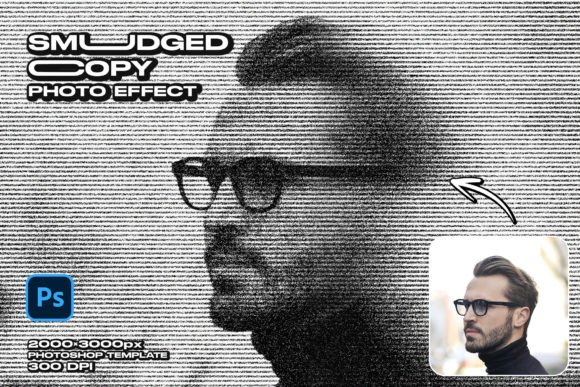
While the concept is compelling, achieving a convincing and high-quality smudged effect manually in Photoshop can be time-consuming and requires a nuanced understanding of blending modes, brushes, and texture overlays. This is where a dedicated resource becomes invaluable. Introducing the Smudged Copy Photo Effect PSD template, a meticulously crafted resource designed to streamline this creative process. This high-resolution 3000x2000 px template provides the foundation for an authentic, handcrafted look without the hours of manual work.
The template is built for practicality and ease of use. At its core is easy customization through smart object replacement. This means you can simply open the designated smart layer in Adobe Photoshop, place your own photograph, save the file, and watch as the complex smudged copy effect is automatically and seamlessly applied to your image. The process is designed to be effortless, allowing photographers, designers, and hobbyists to focus on their creative vision rather than technical hurdles.
Features Built for Modern Creative Workflows
Understanding the technical specifications of a resource is crucial for professional integration. The Smudged Copy Photo Effect PSD template is engineered with current workflow demands in mind:
- High-Resolution Foundation: With a canvas size of 3000×2000 pixels at 300 DPI, the template is suitable for both digital displays and high-quality print projects. This ensures your final output remains sharp and detailed, whether it’s for a website banner, a social media post, or a printed poster.
- Fully Editable PSD Structure: The template isn't a flattened file. It’s a fully editable PSD, meaning all layers—such as the smudge textures, grain overlays, and adjustment layers—are accessible. This grants advanced users the freedom to tweak opacity, color tones, and effect intensity to perfectly match their project’s aesthetic.
- Integrated Design Elements: To ensure a cohesive final product, the template includes free fonts that complement the smudged aesthetic. A comprehensive help file is also included, guiding users through the customization process step by step.
- Ongoing Support: The provision of free author support adds significant value, offering a resource for troubleshooting or advanced customization questions, which is particularly beneficial for those newer to Photoshop.
It is important to note that the model images and photos are for presentation purposes and are not included in the download. The template provides the effect mechanism; your own photography provides the subject and story.
Practical Applications and Creative Implications
The utility of this effect and template extends across numerous fields. For graphic designers, it’s a quick way to add texture to client presentations, mood boards, or promotional materials. Photographers can use it to create a unique series of prints or a standout portfolio piece that breaks from the norm. Social media managers and marketers can employ it to craft eye-catching visuals for campaigns that aim to feel retro, gritty, or artisanal—think promoting a local coffee roaster, an indie band, or a handmade goods shop.
Furthermore, for educators and bloggers, the effect can make instructional graphics or personal narrative visuals more engaging and memorable. It transforms a standard step-by-step image into something that feels like a page from a personal journal or a workshop handout. The key is that the smudged copy photo effect is not a one-size-fits-all filter; its impact is deeply contextual, allowing it to adapt to the creator's intent.
Getting Started: A Realistic Approach
To leverage this template effectively, begin with a clear creative goal. Choose a source image that will benefit from added texture and a slight abstraction—portraits, still life, urban landscapes, or textured objects often work exceptionally well. The effect tends to emphasize emotion and mood over minute detail, so select photos where atmosphere is more critical than absolute clarity.
Once applied via the smart object, the real power lies in customization. Experiment with the editable layers. Perhaps desaturate the smudge texture slightly for a more muted look, or increase the grain for a harsher, more printed feel. The goal is to make the effect serve your image, not overwhelm it. Use the included help file to understand the structure, and don’t hesitate to reach out for author support if you encounter a creative or technical roadblock.
In a digital environment that often prioritizes the flawless, the deliberate introduction of a smudged copy photo effect is a statement of intentional creativity. It’s a tool for adding soul to pixels, for creating images that resonate with a sense of touch and history. The provided PSD template offers a practical, high-quality gateway to this aesthetic, empowering creators to efficiently produce visuals that are not only seen but felt. As visual communication continues to evolve, techniques that blend digital precision with analog charm will remain a vital part of the creative toolkit.