Mastering Etsy Listings: A Guide to Invitation Papers Mockups
In the crowded marketplace of Etsy, the first impression isn't just important—it is everything. When a potential buyer scrolls through search results, they aren't seeing your actual product first; they are seeing the thumbnail. If that thumbnail doesn't stop their thumb from scrolling, you lose the sale before it even begins. This is where the concept of "Invitation Papers Listing Mockups" becomes a critical asset for digital sellers. It is about bridging the gap between a digital file and a tangible experience, allowing customers to visualize exactly what they are buying.
Visualizing the Intangible: What Are Invitation Papers Listing Mockups?
At its core, a listing mockup is a digital canvas designed to display your work in a realistic setting. However, the specific category of Invitation Papers Listing Mockups goes a step further. These are not generic frames; they are styled environments that mimic the texture, weight, and lighting of actual stationery. Imagine a crisp, cotton-fiber paper stock lying on a marble countertop, or a suite of floral invitations tied with a silk ribbon against a rustic wood background. These mockups provide the visual vocabulary that tells the customer, "This is a high-quality, printable product."
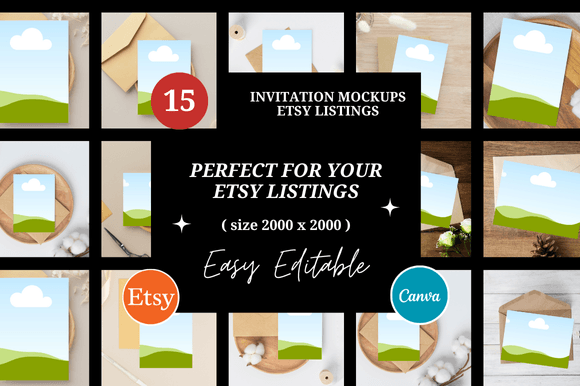
The visual characteristics of these templates usually lean towards high-resolution photography with soft, natural lighting. The "personality" of the mockup should match the style of your invitation. For example, a bohemian wedding invitation looks best on a mockup featuring dried flowers and linen textures, whereas a minimalist corporate event invite requires a clean, sans-serif aesthetic with sharp shadows. By using a curated set of 15 Etsy Listings Mockups, you create a cohesive brand story across your entire shop page, making your digital products feel like premium physical goods.
Strategic Placement: Beyond the Wedding Invite
While the most obvious use case is for wedding stationery, the utility of Invitation Papers Listing Mockups extends across various niches. If you are selling baby shower invites, graduation announcements, or even business event tickets, the mockup serves as the stage. For digital planners and printables, these mockups help demonstrate how the final product will look once printed and bound, addressing the common customer hesitation of "will this look good when I print it at home?"
Here is how different creative professionals can leverage these assets:
- Graphic Designers: Use mockups to present logo concepts or brand identity suites. Showing a logo on a mock invitation paper adds a layer of professionalism that a flat vector file cannot convey.
- Content Creators & Bloggers: Use these templates for social media graphics. A well-styled mockup makes for an engaging Instagram post or Pinterest pin, driving traffic back to your shop.
- Etsy Sellers: Use the Customizable 15 Etsy Listings Mockups to refresh your shop seasonally. Changing your backgrounds from summer florals to autumn leaves keeps your store looking current without a total rebrand.
The Psychology of Presentation and Readability
Why does a mockup influence a customer's decision to purchase? It comes down to psychology and visual hierarchy. A flat design file can often feel abstract. By placing that design into a context—such as a mockup of a card held in hand—you instantly establish scale and readability. Customers can see the font size relative to the paper, the contrast of the ink against the stock, and the overall aesthetic.
This is where the choice of typeface in your actual design becomes crucial, and the mockup acts as the testing ground. If you are using a flowing script font, a cluttered background in the mockup will kill the legibility. Conversely, a bold display font needs a clean, simple mockup to shine. The mockup helps you evaluate the "visual weight" of your design. Does the invitation look too heavy? Is the hierarchy clear? By utilizing Canva Link Templates, you can drag and drop your designs into these pre-built scenes to instantly audit your work.
Practical Application: Maximizing Your Digital Assets
To get the most out of a bundle like the Customizable 15 Etsy Listings Mockups, you need to think like a brand strategist. Consistency is key to brand recognition. If every listing in your shop uses a different lighting style or background texture, your shop will look disjointed and amateurish.
Here is a practical workflow for utilizing these templates:
- Establish a Cohesive Theme: Select 3 to 5 backgrounds from the bundle that align with your brand's color palette. If your brand is soft and romantic, stick to pastels and airy textures.
- Test Your Font Pairings: Use the mockup to see how your header serif font pairs with your body sans-serif font. A modern typography stack looks different on a screen than it does on a textured paper mockup.
- Check Commercial Licensing: Always ensure your design assets include commercial licenses. Since you are selling the final printable product, you need the right to use the mockup to sell it.
- Optimize for Square Listings: Etsy favors 2000 x 2000 px square images. Ensure your mockup templates are cropped to this size to maximize the real estate in search results.
Elevating Your Brand Identity
Ultimately, using high-quality Invitation Papers Listing Mockups is about elevating your brand identity. It signals to the buyer that you care about presentation, which implies you also care about the quality of the digital files you are selling. Whether you are creating web design elements, packaging design concepts, or social media graphics, the mockup is the bridge between your creativity and the customer's perception. By investing time in curating your listings with professional templates, you transform your Etsy shop from a simple digital store into a compelling visual gallery. Enjoy the process of designing, and let your mockups do the heavy lifting of selling for you.