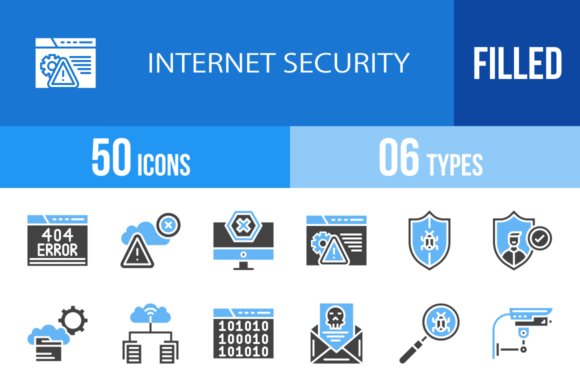
50 Internet Security Blue Black Icons for Digital Trust
In the digital landscape, trust is currency. Whether you are managing a corporate intranet, building a mobile banking app, or designing a cybersecurity presentation, visual communication plays a pivotal role. Generic stock photos often fail to convey the technical precision required for security topics. This is where a specialized set of 50 Internet Security Blue Black Icons becomes an indispensable asset. This collection is not merely a decorative addition; it is a functional toolkit designed to bridge the gap between complex security concepts and user understanding.
The Strategic Value of Blue and Black Iconography
Color psychology is vital in UI/UX design, particularly regarding safety. Blue is universally recognized as the color of stability, trust, and professionalism. When paired with black, which conveys authority and sophistication, the result is a visual language that immediately reassures users. These 50 Internet Security Blue Black Icons utilize this specific palette to create a cohesive look that fits seamlessly into dark mode interfaces or high-contrast corporate dashboards.
However, the utility of this set goes beyond aesthetics. The icons are designed using a unigrid system. For the uninitiated, this means every icon shares consistent pixel grid lines, stroke weights, and padding. This mathematical precision ensures that when you place the "Padlock" icon next to the "Shield" icon, they look like they belong together. This consistency is crucial for maintaining a professional appearance in any application.
Comprehensive Coverage of Security Concepts
One of the standout features of this collection is its breadth. It moves beyond simple representations of locks and keys to cover the nuanced spectrum of modern cybersecurity. The set includes 100 vector icons in total—comprising both line art (blue/black) and filled versions. Here is a look at the variety included in these 50 Internet Security Blue Black Icons:
- Access and Authentication: Icons for Face Scan, Fingerprint Scan, Verification, and Secured Access. These are essential for login screens or multi-factor authentication prompts.
- Threats and Vulnerabilities: Visuals for Malware, Spyware, Trojan, Phishing, and Blackmail. These help educate users about specific dangers without needing lengthy text explanations.
- Network and Devices: Representations of Router Device, Web Camera, USB, Mobile Security, and CCTV. Perfect for IT infrastructure diagrams.
- System Status: Indicators like 404 Error, Access Denied, Infected, Clean, and Unprotected. These are vital for real-time system monitoring dashboards.
By covering such a wide array of topics—from Binary Code to Secure Payment—this set ensures that designers have a visual shorthand for almost any security scenario they might encounter.
Practical Applications for Professionals
How do you actually use these assets in the real world? The versatility of the 50 Internet Security Blue Black Icons makes them suitable for a variety of professional contexts.
For App Developers and UI Designers
If you are building a fintech app or a secure messaging platform, user experience is paramount. Using the Secure Messaging or Cloud Computing icons provides instant context. Because these icons come in SVG format, they are infinitely scalable. You can resize them for a tiny favicon or a large splash screen without losing quality. The availability of both line and filled versions also allows for better visual hierarchy—using filled icons for active states and line icons for inactive states.
For Educators and Content Creators
Cybersecurity can be a dry subject for the average adult. Teachers, bloggers, and YouTubers can use these icons to break up text and illustrate concepts. For example, a blog post about avoiding scams can use the Phishing and Spoofing icons to draw attention to key warnings. The Bug and Virus icons serve as excellent visual anchors when explaining the difference between software glitches and malicious attacks.
For Corporate IT and Presentations
Presenting a security audit to stakeholders? Slides filled with text are monotonous. Incorporating these icons into your PowerPoint or Keynote deck can make data more digestible. Using the Database, Data Encryption, and Backup icons helps structure the flow of information, guiding the audience through the layers of your security architecture.
Technical Flexibility and File Formats
A significant strength of this collection is its readiness for production. The package includes 6 different formats: AI, CDR, EPS, JPG, PNG, and SVG. This variety is not arbitrary; it addresses different workflow needs.
- Vector Formats (AI, CDR, EPS, SVG): These are editable. You can change the color, stroke width, or shape of the icons using software like Adobe Illustrator or CorelDRAW. If your brand requires a slightly different shade of blue, you can customize it easily.
- Raster Formats (JPG, PNG): These are ready for immediate use. The PNG files are particularly valuable as they come with transparent backgrounds, allowing them to be placed over any color or image without a white box surrounding them.
This "ready to use" approach saves significant time for designers who might otherwise spend hours redrawing assets to fit a specific project's requirements.
Improving User Trust and Interface Clarity
Why does visual representation matter so much in security? It comes down to cognitive load. When a user sees a warning, they need to process it instantly. The Warning and Alert icons in this set are designed to be recognizable at a glance. Similarly, the Safety and Shield icons provide immediate visual confirmation that a process is secure.
Using consistent iconography like the 50 Internet Security Blue Black Icons reduces friction. Users don't have to guess what a button does; the visual cue aligns with their mental model of digital safety. This leads to a smoother user experience, higher engagement rates, and ultimately, a more secure interaction because users are less likely to ignore clear visual warnings.
Conclusion: A Foundational Asset for Digital Creators
In summary, the 50 Internet Security Blue Black Icons offer a robust solution for anyone needing to communicate digital safety. They combine the psychological reassurance of blue and black color schemes with the technical precision of a unigrid system. Whether you are a freelancer designing a website for a client, a developer building a secure portal, or an educator explaining the internet to students, this set provides the visual vocabulary you need.
With 100 vector icons covering everything from Ad Blockers to Root Directories, and the flexibility of multiple file formats, this collection is built for practical, real-world application. It is an investment in clarity, professionalism, and user trust.