Track Your Emotions with Color: The Ultimate Guide to Editable Canva Mood Trackers
In the fast-paced rhythm of modern life, our mental and emotional well-being often takes a backseat to our endless to-do lists, professional obligations, and digital distractions. We track our steps, our calories, our sleep, and our screen time, yet we frequently neglect the most crucial metric of all: our mood. Understanding your emotional landscape is the first step toward better mental health, increased self-awareness, and a more balanced life. Enter the Editable Canva Mood Tracker Template—a vibrant, customizable, and infinitely reusable tool designed to make emotional tracking not just easy, but genuinely enjoyable.
Gone are the days of dull, rigid spreadsheets or pre-printed planners that don't quite fit your style. With the power of Canva's intuitive design platform, you can now take control of your emotional journaling through beautifully designed Monthly and Yearly Mood Tracking Charts. These templates are more than just digital files; they are a gateway to a personalized wellness routine that grows with you.
What Exactly is a Mood Tracker?
Before diving into the specifics of these editable templates, it is essential to understand the concept of mood tracking itself. At its core, a mood tracker is a visual log of your daily emotional state. It transforms abstract feelings into tangible data. By recording how you feel on a daily basis, you create a map of your emotional highs and lows.
This practice is often associated with bullet journaling, a popular organizational method that combines planning, diary writing, and creativity. However, you do not need to be an artist to benefit from this practice. A mood tracker serves three primary purposes:
- Pattern Recognition: It helps you identify triggers. Do you tend to feel anxious on Sundays? Is your mood generally brighter after a specific activity, like exercise or reading?
- Accountability: It encourages you to pause and check in with yourself daily, fostering a habit of mindfulness.
- Communication: For those working with therapists or counselors, a visual mood chart can be an invaluable tool for discussing emotional patterns over time.
The Power of Editable Canva Templates
While traditional pen-and-paper tracking has its charm, it lacks flexibility. If you make a mistake or want to change the color scheme halfway through the year, you are stuck. This is where the Editable Canva Mood Tracker Template shines. Canva is a user-friendly graphic design platform that allows anyone to edit professional-grade designs without needing advanced technical skills.
Customization to Match Your Personality
One of the most significant advantages of using Canva for your mood tracking is the ability to personalize every single element. The templates provided are fully editable, meaning you have complete control over the aesthetic of your planner.
- Change the Fonts: Perhaps you prefer a clean, minimalist sans-serif font for a modern look, or maybe a whimsical script font to make your planner feel more like a diary. You can change the typography to suit your reading preference.
- Adjust the Colors: Color psychology plays a massive role in mood tracking. You can assign specific colors to specific emotions—perhaps yellow for "Happy," blue for "Calm," and red for "Stressed." With Canva, you can adjust the template's color palette to match the meanings you assign to your emotions.
- Add Personal Elements: Feel free to upload your own photos, stickers, or digital drawings to make the tracker truly yours.
The Eco-Friendly and Cost-Effective Solution
A traditional paper planner is a one-time-use product. Once the year is over, or the pages are filled, you need to buy a new one. The Editable Canva Mood Tracker changes this dynamic entirely. Because these are digital templates, they can be printed as many times as you like.
If you make a mistake in April, simply reprint the April page. If you want to start fresh in July, print a new sheet. This infinite reusability makes it an incredibly cost-effective solution. Furthermore, by printing only what you need, you reduce paper waste compared to buying a full bound planner with pages you might never use.
Exploring the Monthly and Yearly Charts
The package typically includes two distinct types of tracking systems: the Monthly Mood Tracking Chart and the Yearly Mood Tracking Chart. Both serve different but complementary functions in your self-care routine.
The Monthly Mood Tracker
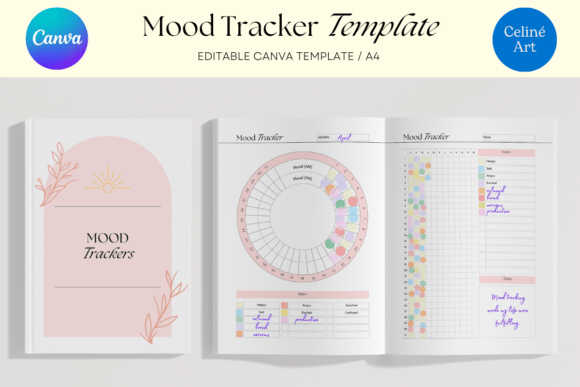
The monthly tracker is designed for granular detail. It usually features a calendar grid or a circular design where each day of the month has its own designated space.
- Daily Logging: This is where you color in or shade a section for the day based on how you felt. Over the course of 30 days, you will build a colorful mosaic that tells the story of your month.
- Identifying Short-Term Triggers: Because the timeframe is short, you can easily correlate specific events with your mood. For example, you might notice that your mood dipped for three days in the middle of the month—a pattern that might align with a specific work deadline or hormonal cycle.
The Yearly Mood Tracker
While the monthly view is great for details, the yearly view is about the "big picture." This chart usually condenses the entire year into a single page, with small icons or blocks representing each day.
- Long-Term Analysis: The yearly chart allows you to see seasonal trends. Many people suffer from Seasonal Affective Disorder (SAD), and a yearly chart can visually demonstrate if your mood consistently drops during the winter months.
- Visualizing Progress: If you are undergoing therapy or making lifestyle changes, the yearly chart provides a panoramic view of your progress. You can physically see if the "good" days are becoming more frequent compared to the previous year.
How to Use Your A4 Mood Tracker Effectively
The templates come in a standard A4 size, which is the international standard for paper size (similar to US Letter size). This ensures that they print perfectly on your home printer without needing to adjust margins or scaling settings. Here is a step-by-step guide on how to integrate this tool into your life.
- Define Your Color Key: Before you start tracking, decide what your colors mean. Keep it simple. You don't need 30 different shades. A 5-point scale often works best:
- Great Day
- Good Day
- Okay Day
- Bad Day
- Terrible Day
- Edit in Canva: Open the template in Canva. Customize the headers, change the font to your liking, and ensure the color key matches the colors you plan to use (colored pencils, markers, or digital shading).
- Print Your Sheets: Print the monthly sheets at the beginning of each month. Print the yearly sheet once and keep it on your desk or in the front of your binder.
- The Daily Ritual: Set a specific time each day to fill in your tracker. The best time is usually right before bed. It takes less than a minute. Simply look at the day, reflect on your feelings, and color in the corresponding section.
Clarifying Common Misunderstandings
There are a few misconceptions about mood tracking that are worth addressing to help you get the most out of this tool.
It’s Not Just for People with Mental Health Issues
While mood tracking is a fantastic tool for managing anxiety, depression, or bipolar disorder, it is beneficial for everyone. Even if you consider yourself mentally healthy, tracking your mood can help you optimize your productivity and happiness. It can reveal how diet, sleep, and social interactions affect your general well-being.
It Doesn't Have to Be Perfect
Some people hesitate to start because they fear they will "mess up" their beautiful planner. Remember, the purpose of this tracker is utility, not perfection. If you miss a day, don't stress. Just leave it blank or fill it in the next morning. Because the template is editable and printable, the pressure is off. If you spill coffee on your printed page, you can just print another one.
It’s Not a Substitute for Professional Help
While tracking your mood is a form of self-care, it is not a replacement for professional medical advice or therapy. If your mood tracker consistently shows prolonged periods of depression or extreme volatility, it is a signal to seek help from a professional, not just a tool to manage it alone.
Practical Relevance in Modern Life
In an era dominated by technology and screens, there is a unique satisfaction in the tactile act of coloring in a chart on paper. However, the digital editability of this template bridges the gap between analog satisfaction and digital convenience.
For students, this tracker can help manage the stress of exams and social pressures. For professionals, it can serve as a burnout barometer, warning you when your work-life balance is tipping too far toward "work." For creatives, it can highlight the correlation between emotional states and creative output.
Moreover, the A4 size makes it easy to integrate into existing systems. You can hole-punch the pages and add them to a standard binder, slip them into a plastic sleeve, or pin them directly to a corkboard above your desk.
Conclusion: A Colorful Step Toward Self-Awareness
Tracking your mood does not have to be a clinical or boring task. With the Editable Canva Mood Tracker Template, you transform emotional awareness into a creative, colorful, and engaging activity. By utilizing the Monthly and Yearly Mood Tracking Charts, you gain a comprehensive understanding of your emotional health, allowing you to make informed decisions about your lifestyle and habits.
The ability to change fonts, adjust colors, and print unlimited copies ensures that this tool fits seamlessly into your life, rather than forcing you to adapt to a rigid system. Whether you are a seasoned journaler or a complete beginner, these templates offer a flexible and beautiful way to connect with yourself. Start today, print your first page, and begin the journey of painting your emotional landscape—one colorful day at a time.