Strategic Foundations: Leveraging the Canva Photography Website Template for Business Growth
Moving Beyond Aesthetics: The Function of a Photography Portfolio
For photographers and creative service providers, the decision to build a website is rarely just about having an online address. It is a critical business decision that dictates how potential clients perceive your value, navigate your offerings, and ultimately decide to hire you. While many tools promise a quick solution, the Canva Photography Website Template offers a unique strategic advantage: it bridges the gap between high-end design capability and operational simplicity. However, to leverage this tool effectively, one must move beyond viewing it as a mere collection of pretty pages. Instead, it should be approached as a foundational piece of business infrastructure that supports your specific goals, whether that is booking high-ticket weddings, selling fine art prints, or securing commercial contracts.
The primary value proposition of using a template system like Canva is the reduction of "decision fatigue." When building a site from scratch, creative professionals often spend weeks agonizing over font pairings, color hex codes, and layout grids. This time is stolen from revenue-generating activities like shooting, editing, and networking. By utilizing a structured design, you standardize your visual identity immediately, allowing you to focus on the content that actually drives conversions: your portfolio selection, your pricing strategy, and your call-to-action (CTA) placement.
Strategic Planning: Aligning Design with Business Objectives
Before you click "Edit" on your new template, it is vital to define what success looks like for your business. A Canva Photography Website Template is a versatile vessel, but without a clear strategy, it risks becoming a generic placeholder. You must ask yourself: Who is my ideal client, and what action do I want them to take?
For a wedding photographer, the strategy might focus on emotional storytelling and ease of contact. For a commercial photographer, the strategy might center on credibility, client logos, and case studies. The Canva environment allows for rapid iteration, meaning you can tailor these elements to fit your specific niche. Consider the user journey. A potential client landing on your homepage should not have to hunt for your portfolio or your contact information. The template structure usually includes logical sections for this, but you must be ruthless in your editing. Remove any page or section that does not serve the goal of getting the client to book a consultation.
Content Architecture and User Experience
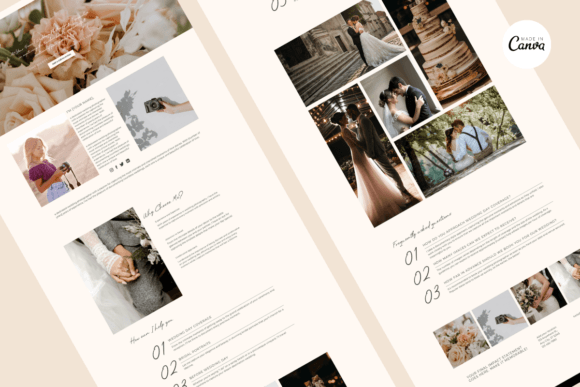
The architecture of your site—the hierarchy of information—matters more than the decoration. A common mistake is treating the "About Me" page as a personal diary. Strategically, this page should be positioned as a "Why Choose Me" page. It should bridge the gap between your personal story and the client's needs. When customizing your Canva Photography Website Template, use this space to address client pain points. If you specialize in family photography, discuss your patience with toddlers. If you shoot corporate headshots, emphasize your efficiency and ability to make executives feel comfortable.
Furthermore, the "Services" or "How It Works" sections are critical for setting expectations. Ambiguity kills conversions. Use the template’s structured text blocks to clearly outline what a client receives, the timeline of the process, and the investment required. This transparency builds trust before you ever speak to the client, filtering out those who are not a good fit and attracting those who value your professionalism.
Operational Efficiency: The "No-Code" Advantage
One of the most significant hurdles for small business owners is the technical barrier of web development. Traditional platforms like WordPress offer immense power but come with a steep learning curve regarding hosting, plugins, and security. The Canva Website Template ecosystem eliminates these operational headaches. Because Canva hosts the site for you, you do not need to worry about server downtime, SSL certificates, or software updates.
This operational simplicity translates directly to agility. In a fast-moving market, the ability to update your portfolio, change your pricing, or announce a seasonal promotion instantly is a competitive advantage. You can edit your site from a tablet or a phone while on location, ensuring your online presence is always current. However, this ease of use comes with a trade-off in functionality. It is important to recognize that Canva websites are best suited for brochure-style sites and portfolios. If you require complex e-commerce integrations or a heavy blogging platform for SEO content marketing, you may need to assess if this specific tool meets those long-term needs or if it serves better as a launchpad.
Visual Consistency and Brand Positioning
Brand consistency is the bedrock of professional positioning. When a client sees your Instagram feed, your email newsletter, and your website, they should feel a seamless visual connection. The Canva Photography Website Template excels here because it utilizes commercial-free fonts and a unified color palette. This ensures that your typography does not clash with your imagery and that your site looks polished across all devices.
However, customization is key to avoiding the "cookie-cutter" look. Do not simply upload your photos and publish. You must inject your brand personality. If your photography style is moody and cinematic, adjust the template’s background colors to darker tones and choose fonts with a bit more weight and drama. If your style is light and airy, utilize white space and delicate typography. The goal is to make the template invisible; the visitor should remember your work and your message, not the fact that they recognized the layout from another site.
Decision-Making: When to Use a Template vs. Custom Code
Knowing when to rely on a Canva Website Template is a matter of business maturity and resource allocation. For a photographer in their first three years of business, or a freelancer pivoting to a new niche, a template is the smart, strategic choice. It allows you to validate your market position and start booking clients without a $5,000 investment in custom web design.
Conversely, established studios with high revenue and complex backend needs (like integrated CRM systems or client proofing galleries hosted on-site) might find the Canva ecosystem limiting. The strategic advice here is to use the template as a "Phase 1" solution. Get profitable, understand your client flow, and then invest in custom development only when the limitations of the template are actively costing you money or efficiency.
SEO and Discoverability: A Realistic Assessment
Search Engine Optimization (SEO) is often misunderstood in the context of website builders. While the prompt mentions "Built-in SEO Optimization," it is important to approach this with realistic expectations. Canva websites are generally single-page or limited-page sites. They are not powerhouses for long-tail keyword ranking compared to a blog-heavy WordPress site.
However, you can still optimize for local search and brand recognition. Ensure your site title, meta description, and headings contain relevant keywords naturally. For example, instead of a generic "My Portfolio," use "Seattle Wedding Photography Portfolio." Use the alt-text features available in Canva for your images. This helps search engines understand what your site is about. The real SEO strategy for a portfolio site often happens off-site—through social media, Google Business Profiles, and backlinks from vendor directories. Your Canva site serves as the "home base" that these external efforts point to, so it must load quickly and look professional when visitors arrive.
Implementation and Long-Term Value
The process of implementation is designed to be frictionless. Upon receiving the template link, the workflow is intuitive: access the design, customize the content, and publish. However, the long-term value is derived from maintenance. A website is not a static brochure; it is a living part of your business. Schedule a quarterly review of your Canva Photography Website Template. Check your analytics (which Canva provides) to see which pages get the most traffic. If visitors are dropping off on the pricing page, perhaps your rates need better framing or your packages need clearer descriptions.
Ultimately, the Canva Photography Website Template